2026 Q2 Open Loyalty product update

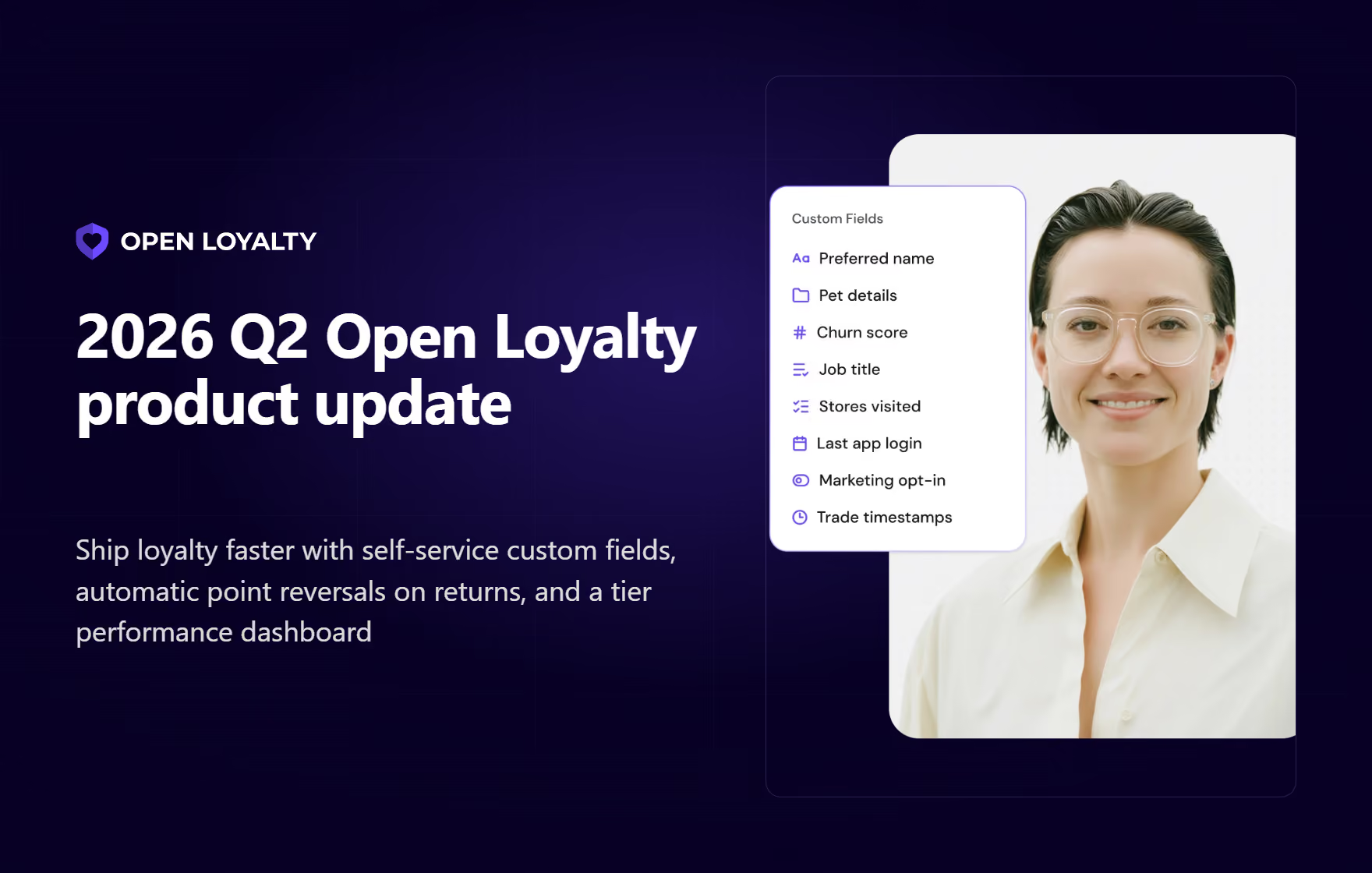
Self-service custom fields, automatic point reversals on returns, and a new tier performance analytics dashboard headline a quarter focused on putting more control in your hands and more safeguards under the hood.
If 2026Q1 was about giving teams a sharper engagement toolkit and stronger controls at scale, Q2 pushed that theme further in two directions at once.
On the one hand, we removed the developer dependency from everyday configuration, so the people running your program can shape it themselves. On the other hand, we hardened the parts of the platform that protect your program's economics and your audit trail.
Q2 highlights include:
- Custom fields – add your own data to campaigns, rewards, and member profiles, with no developer involved
- Automatic point reversals on returns – protect program economics when an order is canceled or returned
- Product category segmentation – target entire product groups, not just single products or brands
- Leaderboard sub-ranking by member attributes – run local or segment-specific contests inside a single leaderboard
- Tier performance analytics dashboard – see exactly where members move through (and get stuck in) your tiers
- Stronger audit and compliance controls – full, traceable logging for every administrator action
- Challenges keep evolving – milestone-aware rewards, copyable milestone IDs, and cross-tenant reuse
- Unit transfer improvement – richer point records and bulk expiration management
Alongside these, the quarter shipped a deep set of engagement, operations, scale, and developer improvements, as well as foundational platform work. Everything is grouped below by how directly it affects the way you run your program.
Custom fields: Store complex data in OL without dev work
Until now, in most cases, storing a piece of data for which Open Loyalty didn't have a field meant submitting a request to your development team.
The new Custom fields remove that step entirely.
What's new
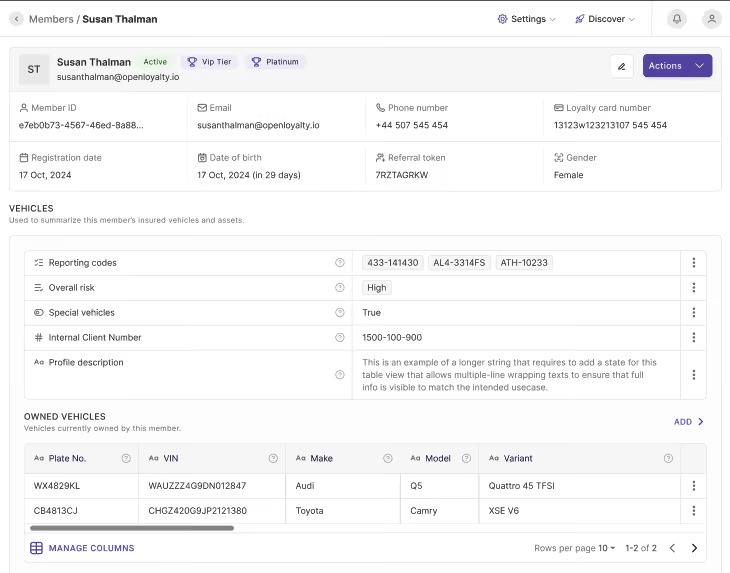
You can now add your own data fields to member profiles, campaigns, and rewards.
You define each field, group it, and control how it is displayed – independently for members and for campaigns – so you can lay fields out for the way your team actually works.
Member profiles support the richest set of field types today, with campaign and reward support continuing to roll out.
Why it matters
There is zero waiting for developers.
When you need to store something specific – an identifier used to map a member to another system, extra member details such as a policy number, owned products, or food preferences, or a regional attribute – you create the field yourself, instantly.
For campaigns, custom fields also make tracking cleaner, letting you store mapping IDs or extra data and surface it the way your downstream systems expect.
Real-life use case
An enterprise brand needs to store a regional code and a partner mapping ID for each member so its CRM and Open Loyalty stay in sync.
Instead of scoping a development ticket, a program administrator creates both fields in minutes and starts populating them the same day.
Documentation: Custom fields.
Automatic point reversals on returns: Protect your margin
A high-value safeguard for anyone whose program rewards purchases: Q2 introduced the "cancel order unit transfer reversal" effect.
What's new
When a customer returns an item or cancels an order, Open Loyalty automatically reclaims the points earned on that purchase – no manual adjustment required.
Why it matters
This is margin protection. Without it, a customer can buy an expensive item, bank the loyalty points, and then return the goods, keeping value they never truly earned.
Automating the reversal closes that gap for every transaction, so your program economics stay intact without your team policing returns by hand.
Real-life use case
An eCommerce retailer runs a points-per-purchase program. A customer buys a high-ticket item, earns points, and returns it a week later.
Points from that order are automatically pulled back, and the member's balance reflects only what they actually kept.
Documentation: Return transactions.
Product category segmentation: Target better for cross-sell and upsell
A targeting gap that marketers have long asked about is now closed.
What's new
There is a new segmentation rule: "bought products with a specific category."
You can now build audiences around whole product categories, not only individual products or brands.
Why it matters
Previously, you could target by a specific product or by brand.
Now you can reach everyone who bought from an entire category with a single rule, enabling straightforward cross-sell and upsell plays across related product groups.
Real-life use case
A retailer wants to promote accessories to everyone who recently bought from its "Electronics" category.
Rather than listing dozens of individual products, the marketer selects the category once and launches the campaign to the full segment.
Documentation: [Add link]
Leaderboard sub-ranking by member attributes
Leaderboards drive competition, but a single overall ranking rarely reflects how members actually relate to one another. Q2 made leaderboards work at the level of any audience segment.
What's new
A leaderboard can now automatically split its participants into independent sub-rankings based on a single member attribute – an address field such as city, province, postal code, or country, or a custom attribute.
Each group competes for its own positions and rewards, all within a single leaderboard campaign. The grouping field is chosen when the leaderboard is created.
Why it matters
Regional or segment-specific contests used to mean building and maintaining a separate leaderboard for every group.
Now one campaign covers them all, so you can run local competitions at a national scale without multiplying your setup or your ongoing maintenance.
Real-life use case
A brand runs a nationwide engagement contest but wants each city to crown its own winners.
It sets the sub-ranking attribute to "city," and every metropolitan area gets its own leaderboard and prize pool – all from a single campaign that the marketing team configures once.
Documentation: Creating leaderboards.
Challenges keep evolving
Q1 introduced Challenges as the unified successor to Achievements and Campaigns. Q2 kept maturing the mechanic on both the builder and the operational side.
What's new
Milestone progress is now available directly in the campaign expression language, so you can build reward logic that reads how far a member has moved through a challenge – for example, firing an effect the moment a specific milestone is reached rather than only when the whole challenge is finished.
Each milestone also gained a one-click "Copy ID" button in its detail view, and challenge configurations can now be duplicated between tenants from Global Management. The separate global cap on the number of challenges was removed, so challenges now sit under the same per-tenant limit as campaigns, and the mechanic continued rolling out across demo environments and additional client markets
Why it matters
Challenges become more expressive and easier to run at scale.
Marketers can drive rewards off real progress instead of completion alone, operators can copy a milestone's ID to wire it into a member-facing system such as a content platform without developer help, and multi-tenant teams can reuse a proven challenge setup instead of rebuilding it market by market.
Real-life use case
A brand runs a "Summer Streak" challenge across several markets.
The team builds it once, sets rewards to fire as members reach each milestone, copies each milestone ID into its content platform to show live progress in the app, and duplicates the whole configuration to its other tenants from Global Management
Documentation: Challenges.
Tier performance analytics dashboard
Tiers are among the most common loyalty mechanics and among the hardest to tune without data. Q2 added a dedicated view for exactly that.
What's new
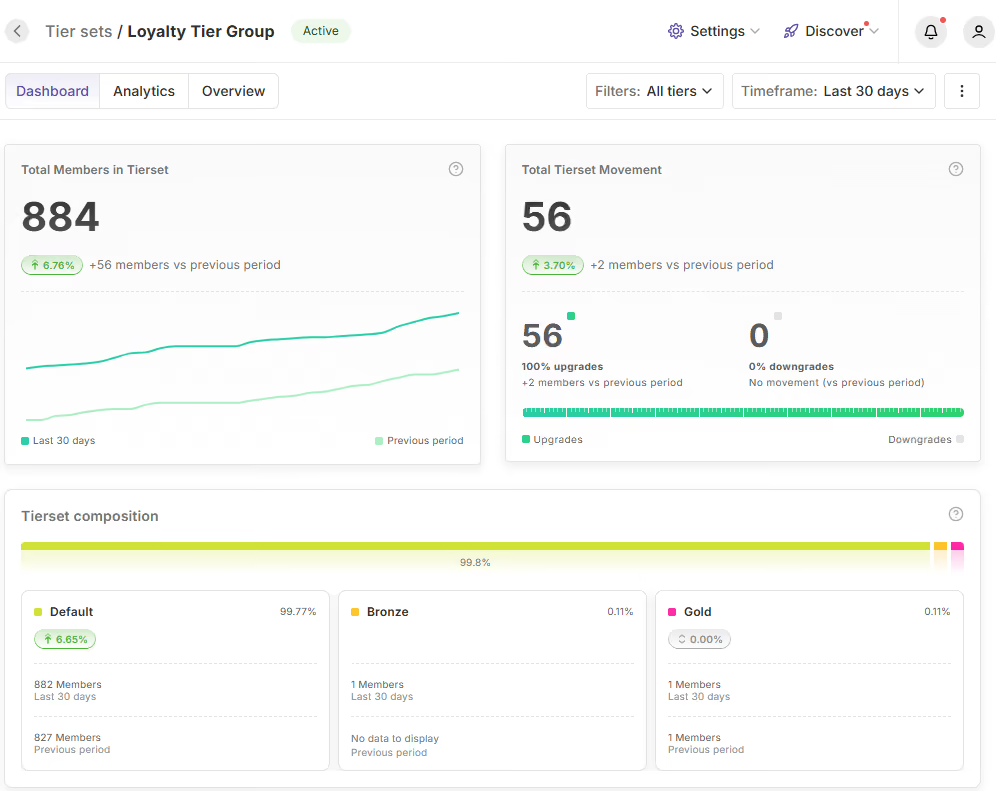
A new analytics view, backed by dedicated reporting endpoints, tracks the average and median time members spend in a tier, the share of members in each tier, the total members per tier set, and how members move between tiers from one period to the next.
Why it matters
You can now see precisely where members are engaging and where they lose momentum.
If members pile up in one tier and rarely progress, or churn out of another, the pattern shows up in the data instead of staying invisible, making it far easier to adjust your tier thresholds and rewards.
Real-life use case
A program manager notices that the median time in the mid-tier has been climbing quarter over quarter, while the top tier's share has stayed flat.
That signals members are stalling before the most valuable tier, and the team responds by adjusting the points needed to progress.
Documentation: Tier analytics.
Unit transfer improvements
Every time points are added, removed, or expired, Open Loyalty records the movement as a unit transfer – the ledger behind your program's economics.
Q2 made those records richer and much easier to manage in bulk.
What's new
Points issued by campaigns can now carry custom attributes – such as campaign type, source, or budget category – directly on the transfer record, extending metadata support that previously worked only on manually created transfers.
Separately, administrators can now set, change, or clear expiration dates across many transfers at once using bulk actions on filtered rows, with the same bulk actions also covering activating, canceling, and expiring filtered transfers. Bulk expiration changes are applied in the background rather than instantly.
Why it matters
The result is cleaner financial reconciliation and far less manual effort.
Finance and data teams can trace exactly which campaign budget or source a point flow came from without cross-referencing, and operations teams can adjust expirations for large batches of points in a single action instead of one record at a time – work that used to require a developer to run a script.
Real-life use case
A retailer wraps up a seasonal promotion and needs to expire leftover promotional points for tens of thousands of members.
An administrator filters the affected transfers and sets the expiration date in one bulk action, and because every campaign-issued point already carries its source tag, finance has the context it needs to reconcile the promotion.
Documentation: Unit transfers.
Stronger audit and compliance controls
For enterprise buyers, traceability is not a nice-to-have – it is a procurement requirement.
Q2 pulled several improvements together into a much stronger compliance posture.
What's new
Logging is now enforced for a defined set of configuration changes and administrator actions across key modules – covering edits to campaigns, rewards, wallets, leaderboards, and member records – and every entry records which administrator made the change.
The "created by" field is now also exposed on manual point transfers, so you can see and filter by who issued each one.
Why it matters
Logging gives you complete business and security traceability. If a configuration breaks or a value looks wrong, you can instantly see exactly who made the change and when.
It closes a gap where administrator actions could previously go unrecorded, and it makes the platform ready for the kinds of IT and security audits to which enterprise programs are held.
Real-life use case
A compliance team preparing for an annual security audit needs configuration changes to be attributable.
They can now show a timestamped record of which administrator changed each setting and who issued each manual point adjustment, without having to reconstruct it after the fact.
Documentation: [Add link]
Challenges
- Following Q1's launch of Challenges, Q2 continued to build the mechanic out. Challenge milestone progress is now exposed natively in the campaign expression language, so you can build reward logic that triggers automatically as a member hits specific progress stages.
- Each milestone now shows its own ID, making it easy to connect a milestone in Open Loyalty to another system such as a content platform.
- Challenges also gained global management and were enabled on sales and demo environments, making the mechanics easier to manage across an organization.
More ways to engage and operate
Beyond the headliners, Q2 shipped a broad set of features that give marketing and operations teams more range in how they build and manage programs.
Auto-deactivate expired campaigns. Campaigns can now switch themselves off automatically between 1 and 90 days after their end date, with every action fully logged.
That removes a recurring manual cleanup task and ensures customers only ever see live offers, which matters most for teams running a high volume of campaigns.
Role-based navigation guards. The admin panel now completely hides sidebar links, header elements, and global search results when an administrator lacks view permission for that module.
Local store managers and support staff see only the tools they are meant to use, which reduces confusion and the risk of accidental misconfiguration in multi-market setups.
Other highlights
Built for scale
Some of the quarter's work went into making sure the platform stays fast and reliable at the volumes enterprise programs demand.
30x faster coupon imports. The reward-coupon importer now writes data in optimized batches.
Uploading very large coupon catalogs – on the path toward our target of 100 million codes – now takes minutes instead of hours, so campaign setup is no longer bottlenecked by imports.
Double-redemption protection during flash sales. We rebuilt how the system selects coupons during a purchase so that, even at extreme concurrency, two people acting in the same instant can never be handed the same single-use code.
During high-traffic moments like a Black Friday drop, this prevents budget leaks and the support headaches that follow.
For the developer and integration teams
Q2 also delivered a substantial set of improvements aimed at the technical teams who integrate Open Loyalty with the rest of your stack. These reduce integration effort, tighten security, and make automation easier to build.
Member Profile PATCH API. The member update API now lets integrations change phone numbers, emails, loyalty card numbers, and custom fields in a single partial call – without first fetching the full record and sending everything back. Sending an explicit null now clears a field.
In practice, this means external systems no longer need a slow, two-step "read then write" cycle to update a profile, which cuts server load and removes the risk of accidentally overwriting data that didn't change.
HMAC webhook authentication. Webhooks now support HMAC signatures, a standard cryptographic method for verifying that a message genuinely came from its stated sender.
Your systems can now confirm that a webhook payload truly originated from Open Loyalty, protecting your integrations against spoofed or forged events.
Points-activation event trigger. A new internal event fires whenever points are activated.
Teams can use it to automate follow-on actions – for example, prompting members to spend newly available points – without building a separate integration to detect that moment.
Microsecond precision on event timestamps. Event timestamps now include microseconds.
For teams building member-facing views, that extra precision enables ordering and displaying activity in a more granular and controlled way, improving the end-member experience.
Real-time wallet balance webhook. A new webhook pushes wallet balance changes in real time, so connected front ends and apps can reflect a member's current balance the moment it changes rather than polling for updates.
Under the hood
Not every improvement is visible in the interface, but the foundational work of Q2 is what keeps everything above fast, secure, and dependable.
During the quarter, we upgraded the platform to Symfony 7, refreshed our React framework, rebuilt parts of our database migration infrastructure, added multi-architecture Docker builds, optimized customer-history queries, and improved the processing of internal events.
Looking ahead
Taken together, Q2 moved Open Loyalty toward a simple principle: the people who run your loyalty program should be able to configure and protect it without waiting on engineering, and the platform underneath should quietly guard your economics, your data, and your audit trail.
Custom fields put configuration in your hands, automatic reversals and concurrency protection guard your budgets, and the analytics and audit improvements give you the visibility to prove and improve what you run.

API-first loyalty and gamification engine